Sheet 00 · SolarERP · ERP + CRM for solar EPC · India

Enquiry se net-meter tak — one system.

Leads from IndiaMART, Justdial and Facebook land in one pipeline. Site survey, proposal PDF, project stages, DISCOM net-metering, PM Surya Ghar subsidy, GST invoices, payroll and AMC — with a staff app in the field and an AI you can talk to.

Trusted by 33+ solar EPC companies across India

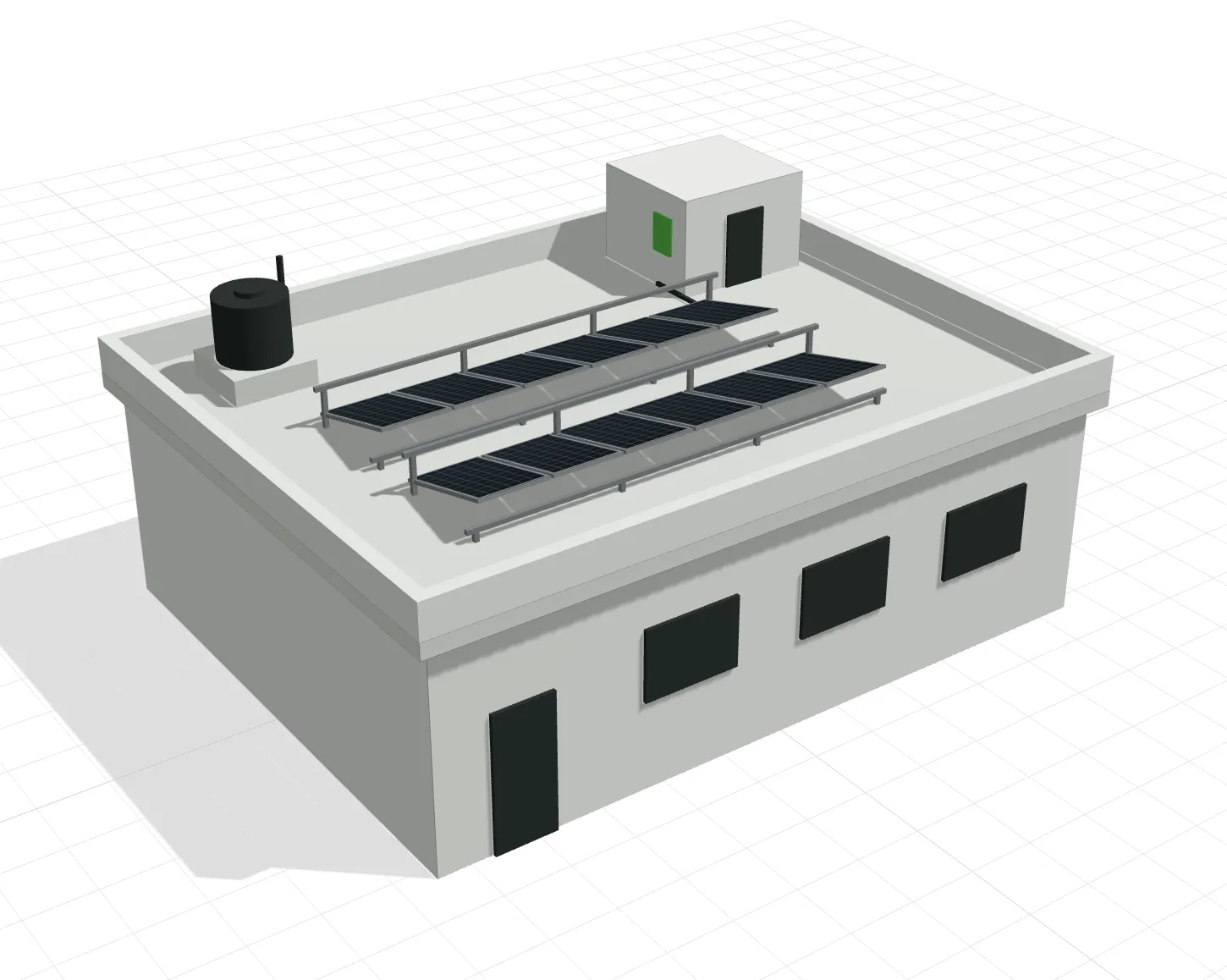
Low-poly 3D model of an Indian RCC rooftop with a water tank and staircase block, fitted with two rows of solar panels Fig. 00 · Rooftop survey · 3D RCC roof 11.4 × 8.9 m · parapet 0.55 Drag to orbit Panels face S · tilt 15°
System size0.00kWp
Annual yield0kWh
System cost₹0incl. GST
Payback0.0years

Survey → proposal numbers update as panels are placed

33+EPC companies live
250+Screens · one login
61Modules · switch on as you grow
1 DBPer company · hosted in India

Legend · the EPC workflow

Lead to AMC without re-typing the customer's name eight times.

  1. 01 Lead
  2. 02 Survey
  3. 03 Proposal
  4. 04 Order
  5. 05 Install
  6. 06 Net-meter
  7. 07 Subsidy
  8. 08 AMC

Each stage hands its data to the next. The consumer number from the survey is already on the net-metering form; the proposal's BOM becomes the material issue; the commissioning date starts the AMC clock.

Chapter 01 · CRM

Every enquiry lands in one pipeline, with its source attached.

Sources
IndiaMART, Justdial, HelloLeads, Facebook & Instagram lead ads, website forms, WhatsApp, a photo of the electricity bill.
De-dupe
Matched on phone and consumer_number; scored hot / warm / cold; auto-assigned by territory or round-robin.
Follow-up
Next-call reminders, stage history, approved WhatsApp templates via WATI / Interakt / Aisensy, SMS via MSG91.
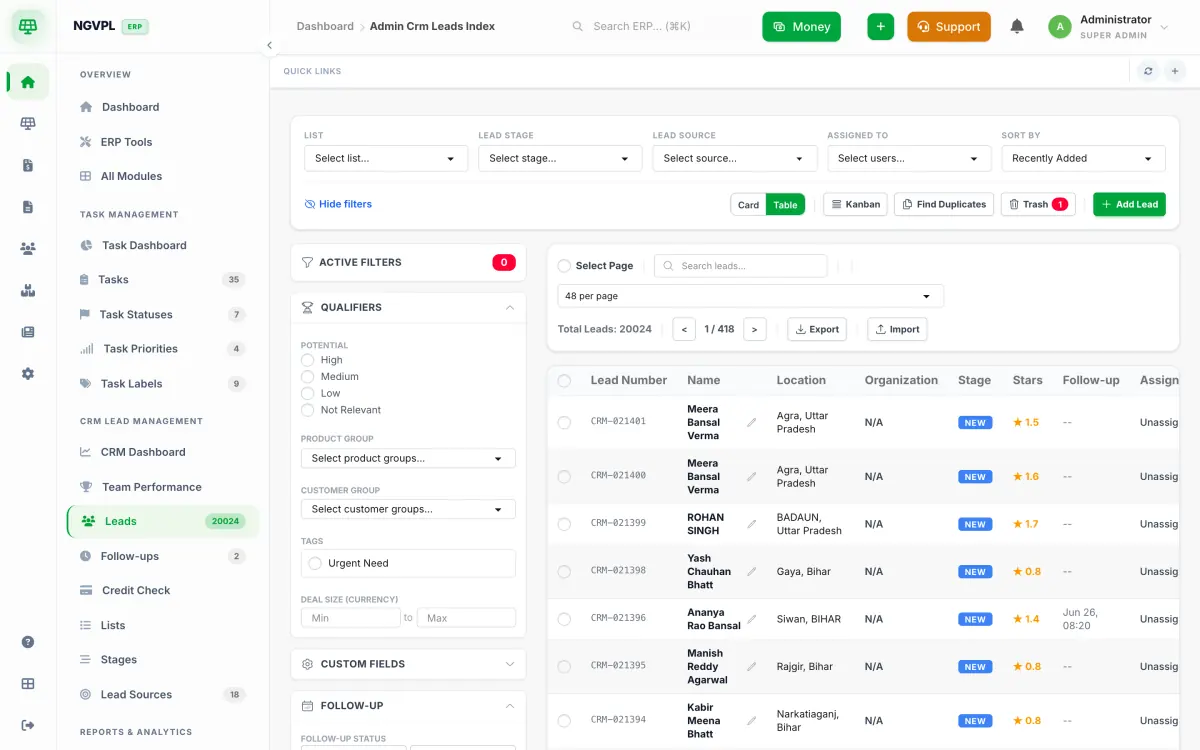
SolarERP CRM: the leads table with lead number, name, location, stage, score and follow-up columns, filters on the left
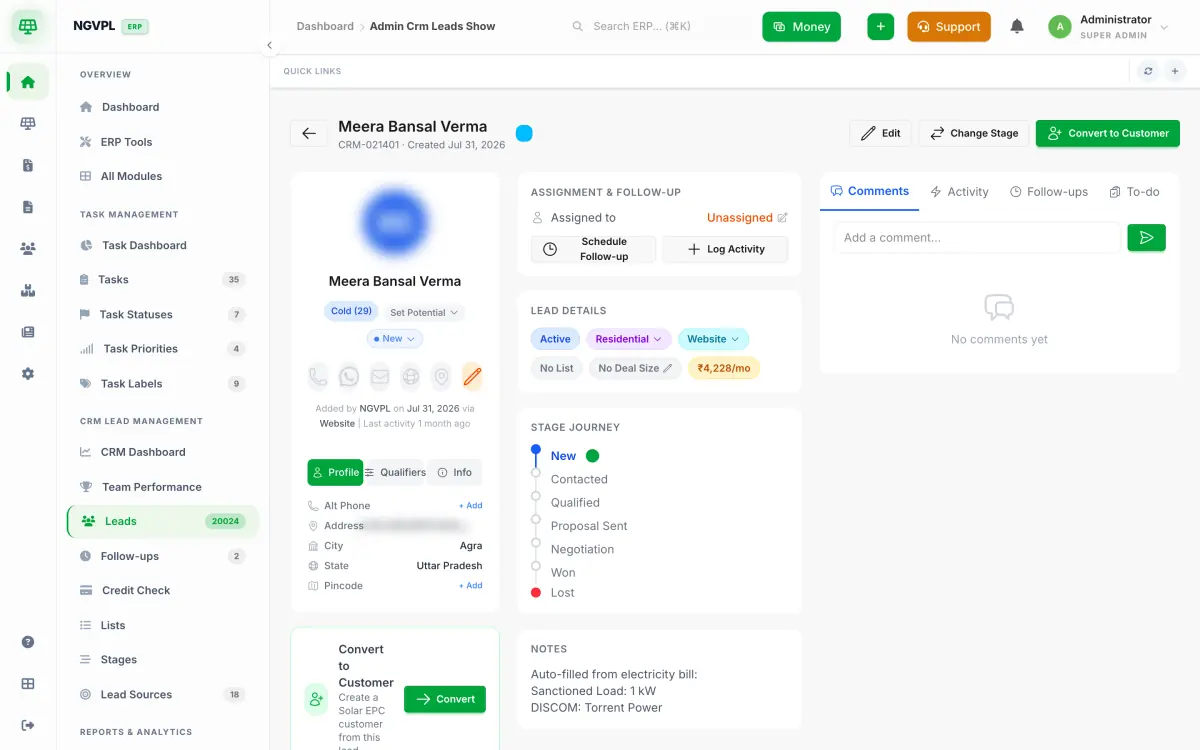
A lead record with stage journey, assignment, lead details and notes auto-filled from an electricity bill
Fig. 01Leads table · lead record

Chapter 02 · Site survey

The technician's phone is the survey form.

Capture
Geotagged roof photos, roof type and condition, usable area in sq ft, sanctioned and connected load, meter and CA number, DG set, LTDB phases.
Fields
Your own field builder — add what your DISCOM asks for; the form on the staff app updates the same day.
Output
A survey PDF for the file, and the proposed kWp that seeds Chapter 03.
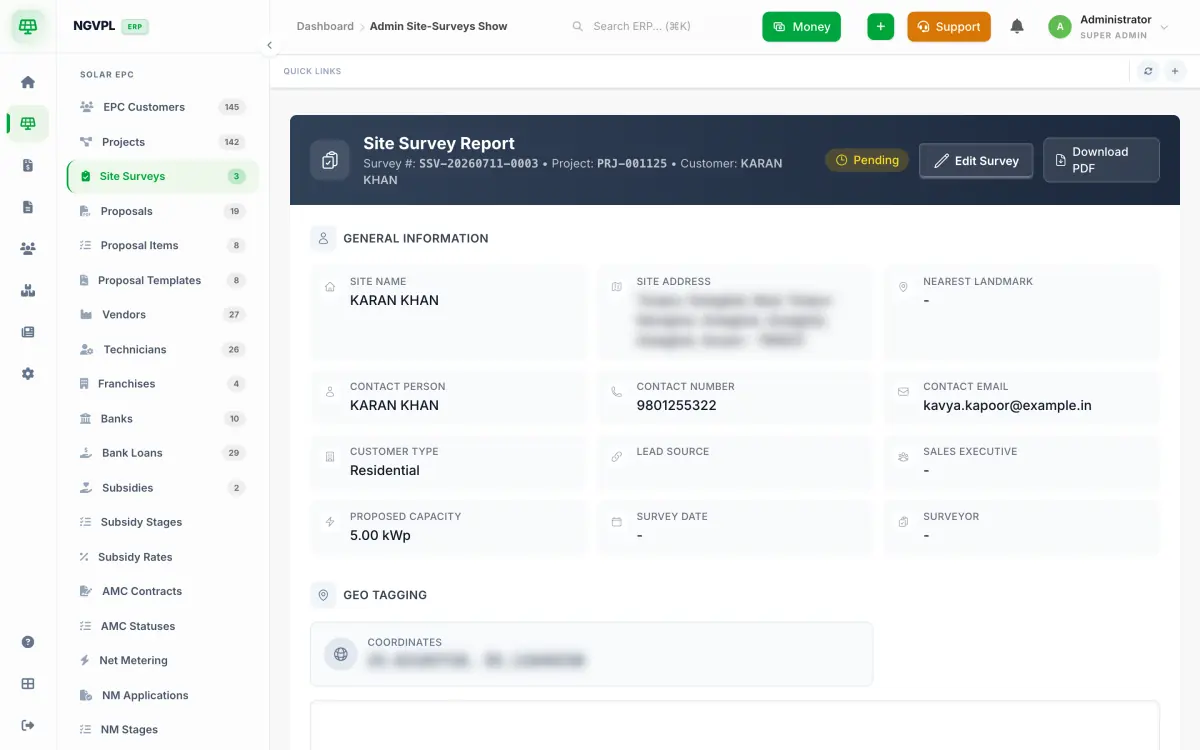
A site survey report: site name, address, contact, customer type, proposed capacity in kWp, geo-tagging coordinates
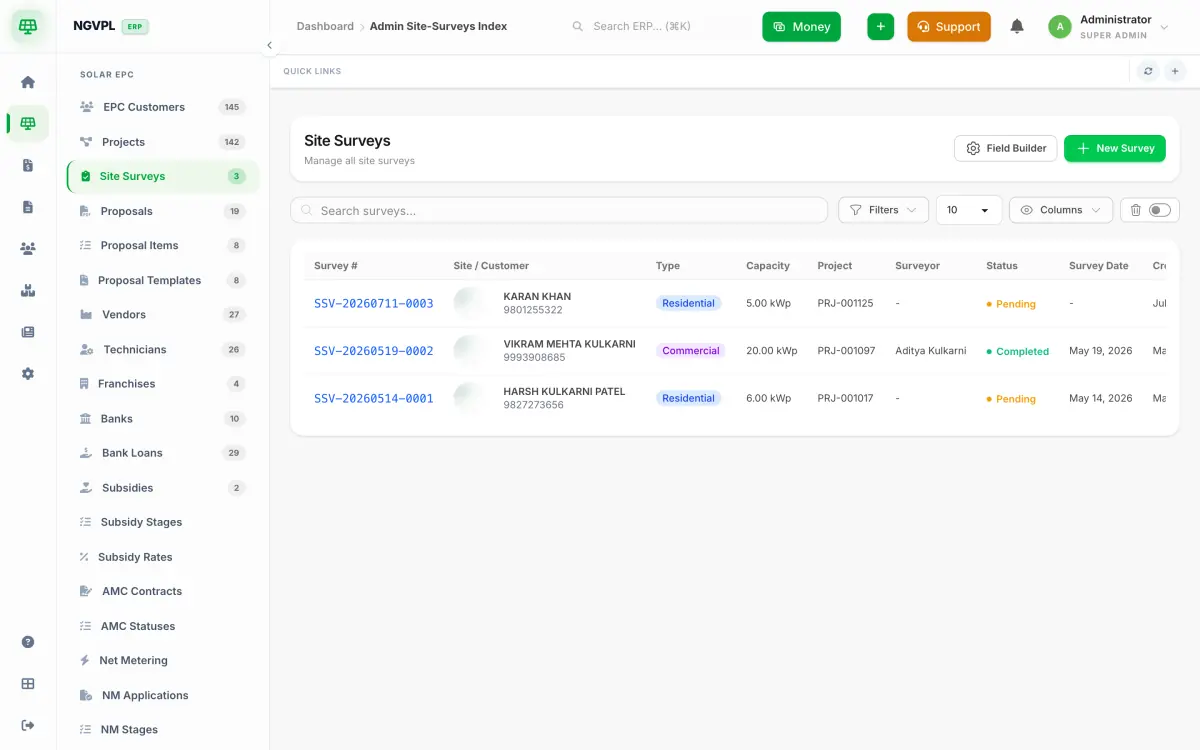
The site surveys list with survey number, site, type, capacity, project, surveyor and status
Fig. 02Survey report · surveys list

Chapter 03 · Proposal

Survey se proposal: a branded PDF in minutes, priced from your own list.

Computes
System size, annual generation, savings, payback, PM Surya Ghar subsidy, EMI if the customer takes a loan — from your item masters, not a spreadsheet.
Templates
Your logo, colours and sections; several PDF templates per company for residential and commercial.
Send
WhatsApp or email in one click; when it is accepted, Convert to project creates the project, tasks and BOM.
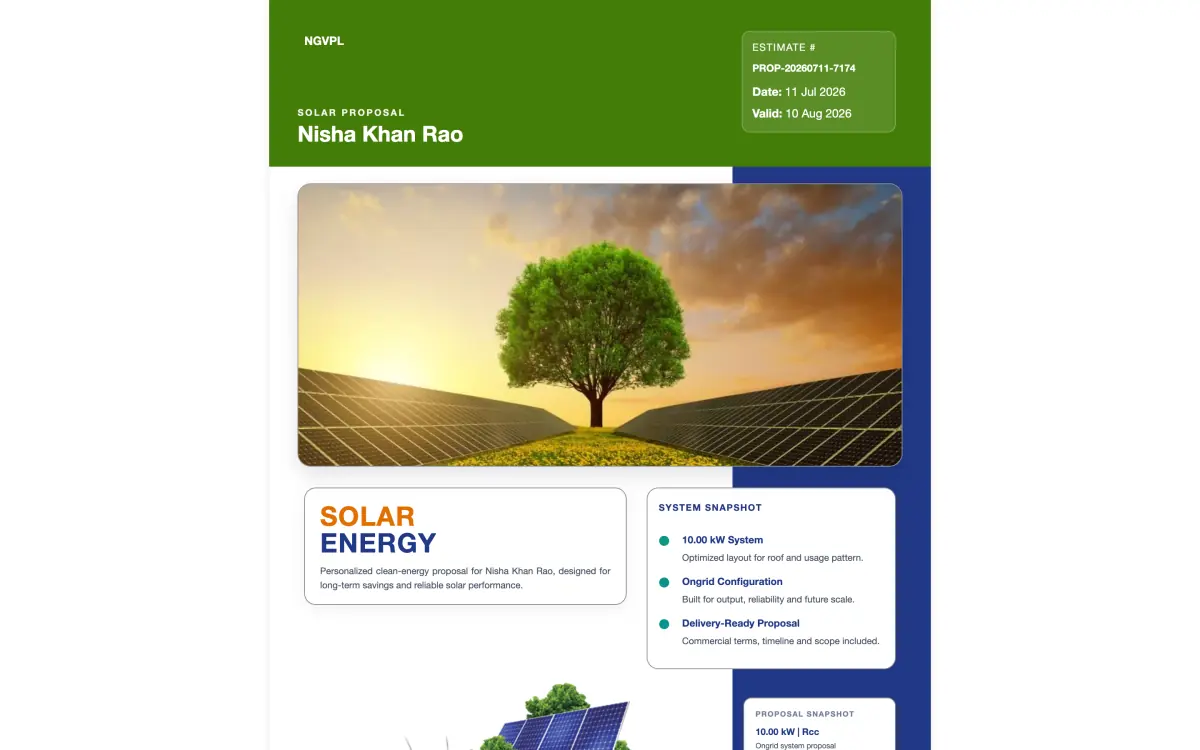
The rendered proposal PDF: company header, estimate number, validity, system snapshot for a 10 kW on-grid system
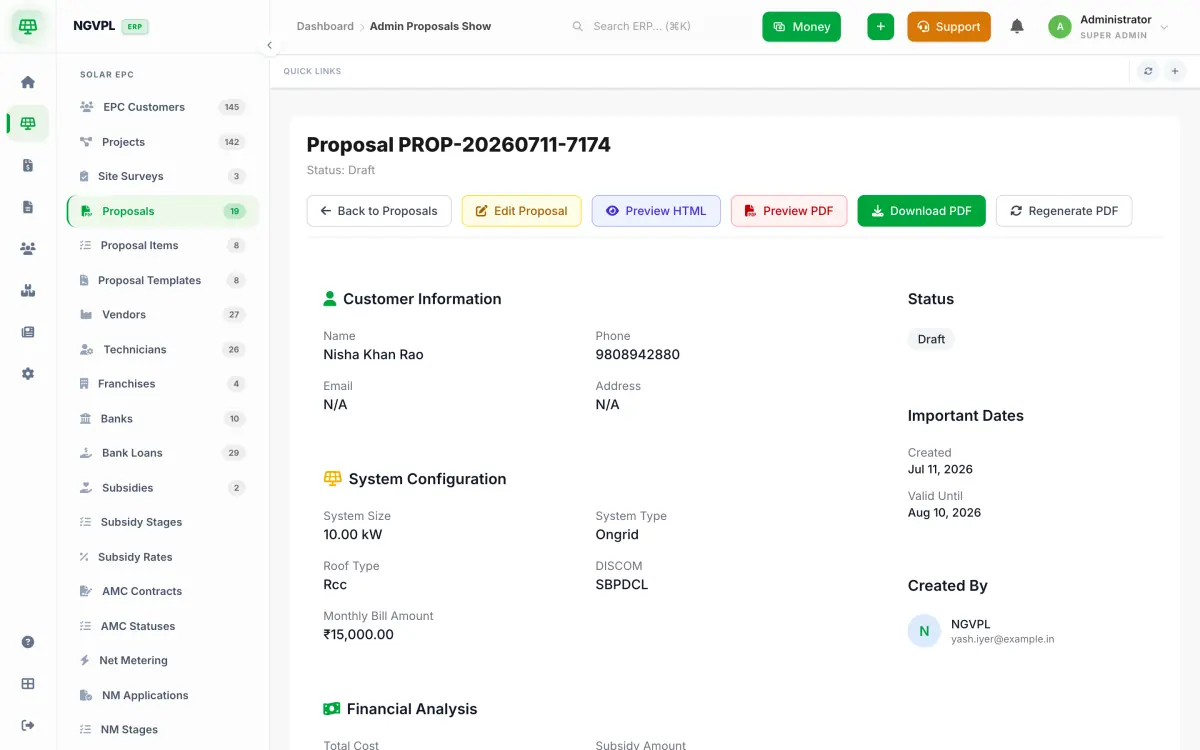
The proposal record: customer, system configuration (10 kW, on-grid, RCC roof, DISCOM), status and actions
Fig. 03Proposal PDF · proposal record

Chapter 04 · Projects

Order to commissioning, stage by stage, with tasks that create themselves.

Stages
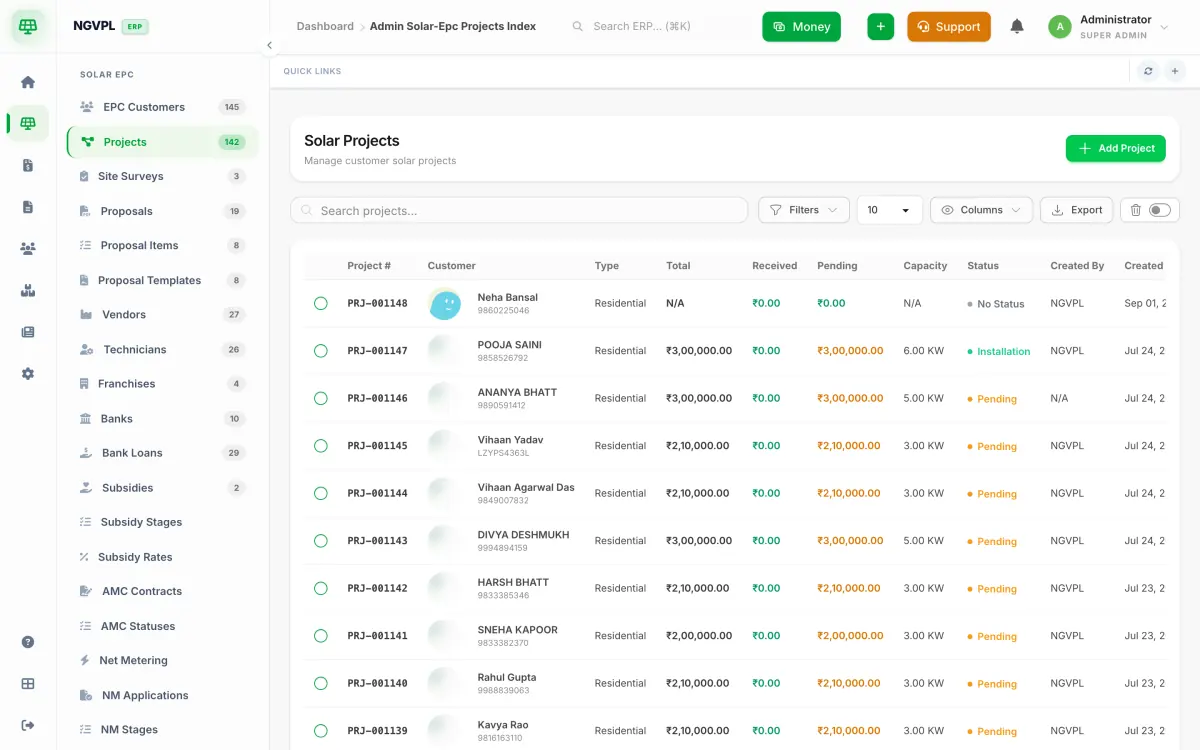
Your own stage list with checklists, photos and customer-visible status; every project shows capacity, cost, received and pending.
Tasks
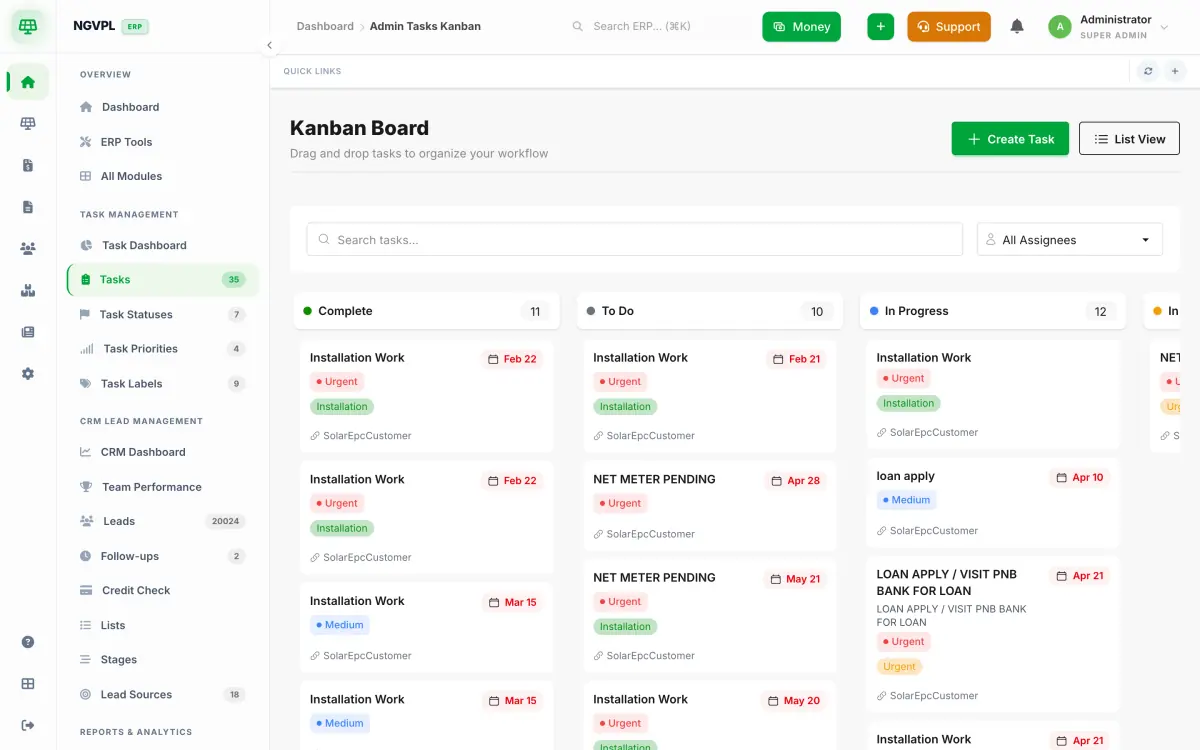
Auto-created from stages, assigned to installers, on the Kanban and on the staff app — with priority, labels and due dates.
Material
The proposal BOM becomes a material issue; serial-tracked panels and inverters leave the warehouse against the project.
The solar projects table with project number, customer, type, total, received, pending, capacity in kW and status
The tasks Kanban board with Complete, To Do and In Progress columns of installation tasks
Fig. 04Projects table · task Kanban

Chapter 05 · Net-metering & subsidy

DISCOM and MNRE are first-class stages, not a custom field someone bolted on.

DISCOM
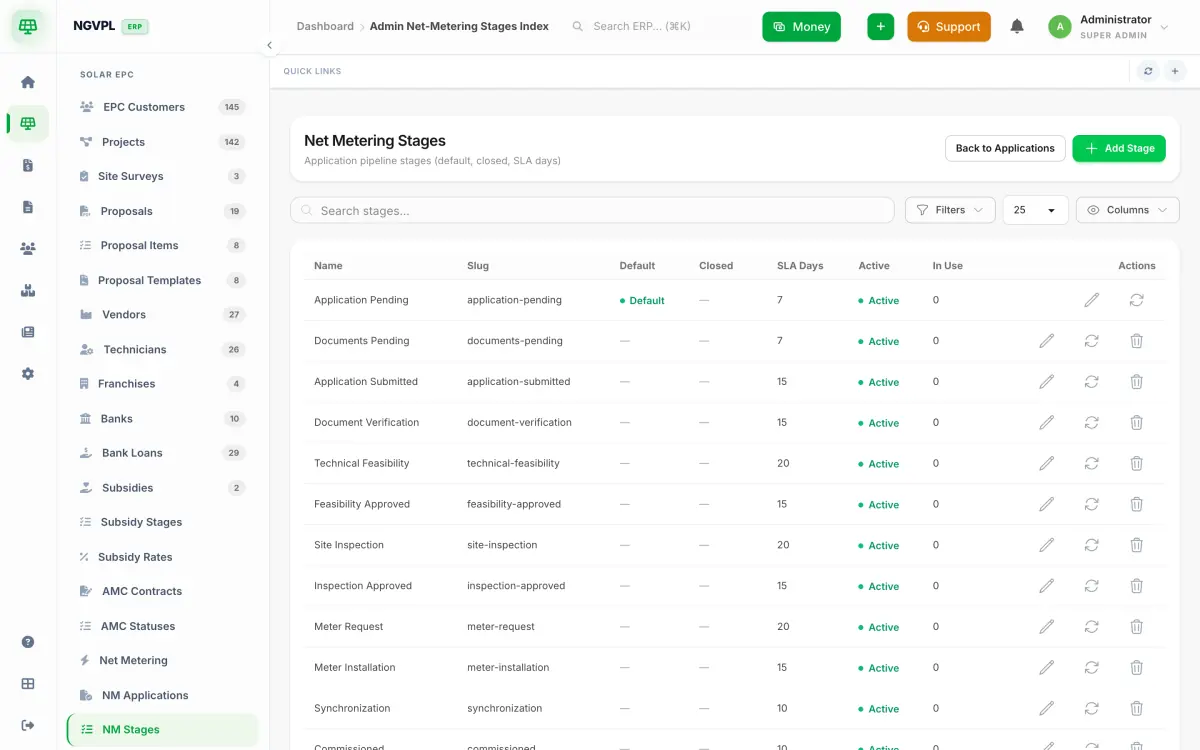
Application → documents → feasibility → site inspection → meter request → installation → synchronisation → commissioning, each with SLA days and follow-ups due.
Subsidy
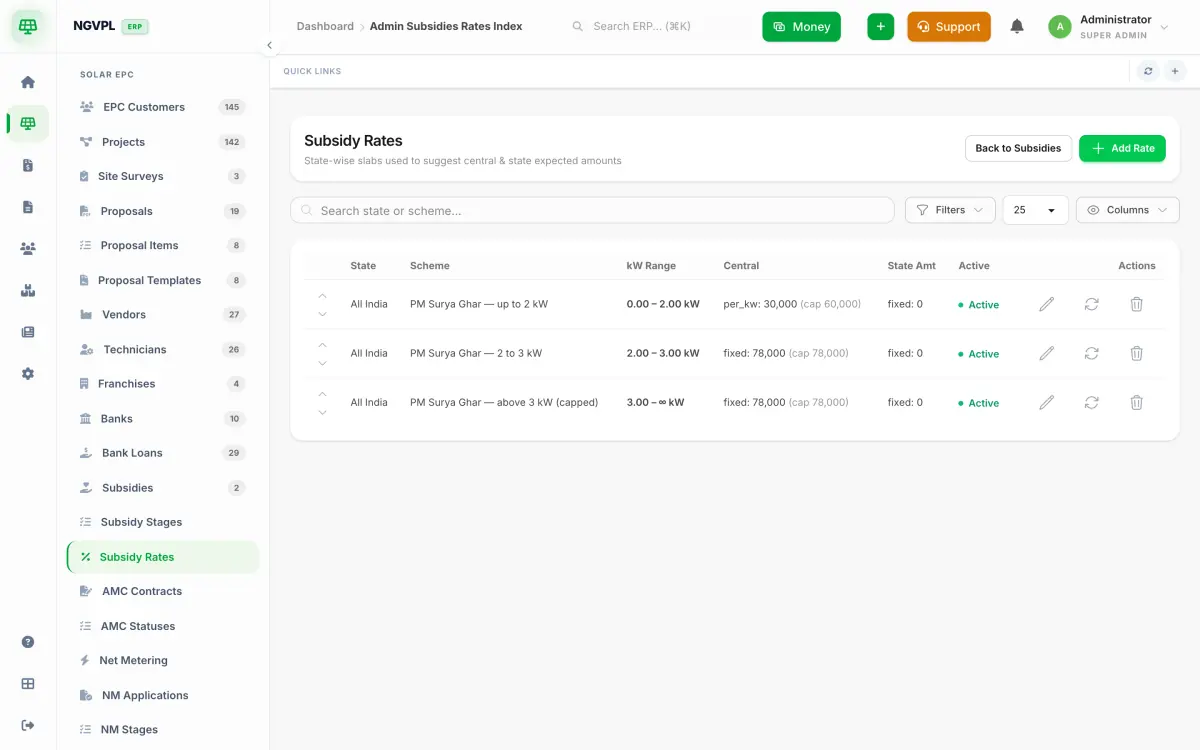
PM Surya Ghar slabs built in: ₹30,000/kW up to 2 kW, ₹78,000 cap from 3 kW, state add-ons per state; claim stages to disbursement.
Masters
DISCOMs and divisions by state — JVVNL, UPPCL, MSEDCL, BSPHCL… — so the consumer number is validated where it is typed.
Net-metering pipeline stages from application pending to commissioned, each with SLA days
Subsidy rate slabs: PM Surya Ghar up to 2 kW, 2 to 3 kW and above 3 kW with central amounts and caps
Fig. 05DISCOM stages · subsidy slabs

Chapter 06 · Finance

GST-correct paper, and receivables you can actually see.

Tax
Place of supply decides CGST + SGST or IGST; HSN/SAC on every line; e-invoice-ready fields; GSTR-friendly exports.
Documents
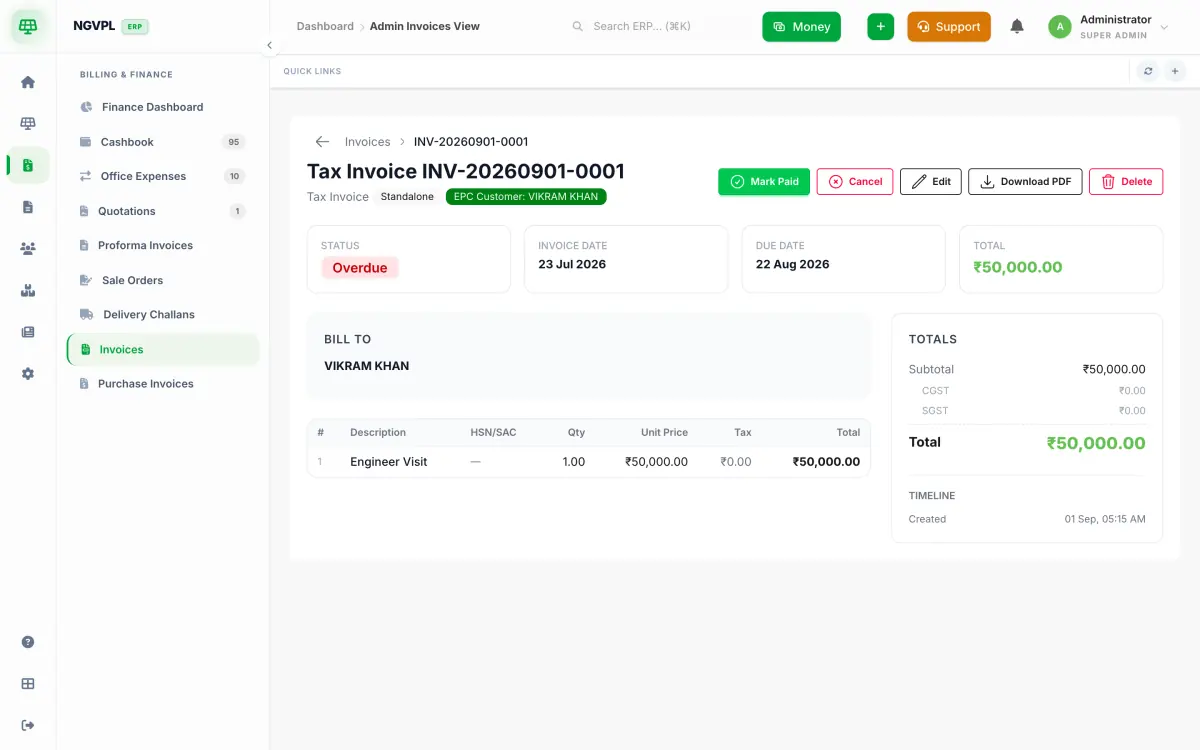
Quotation, proforma, tax invoice, delivery challan, sale order, purchase invoice — numbered INV-2026-0142 style, PDF on demand.
Money
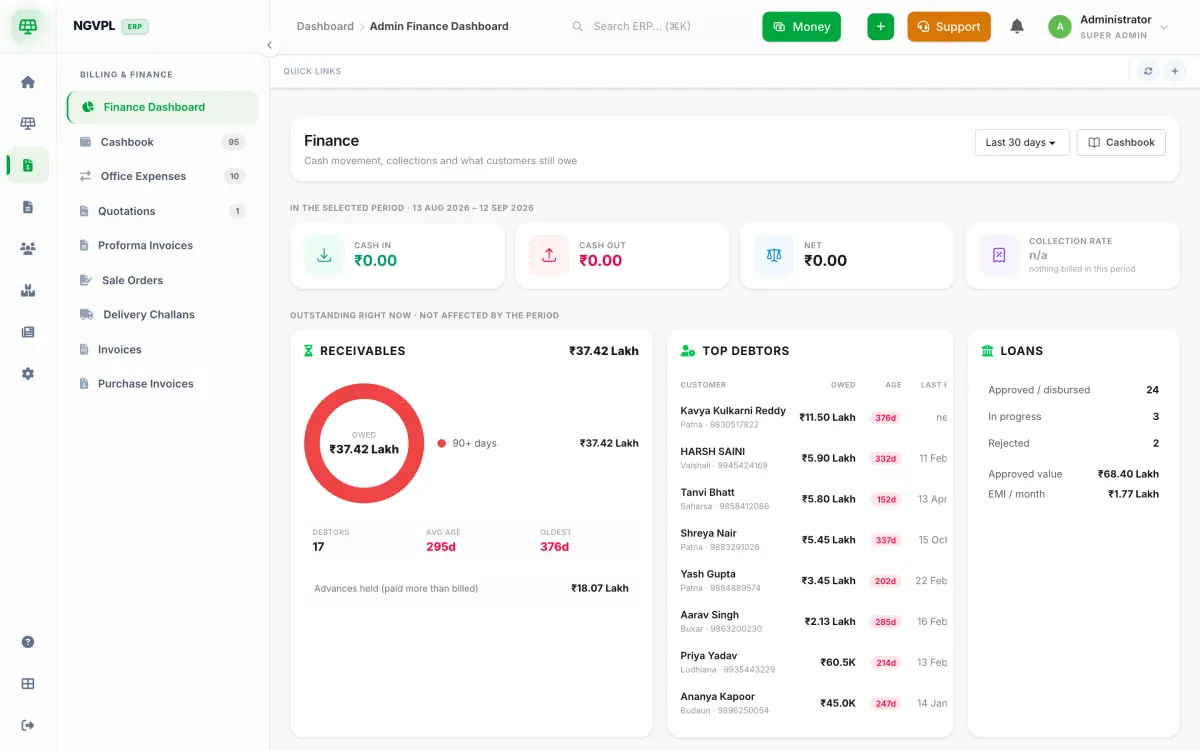
Cashbook, receivables ageing by customer, advances held, loans approved and EMIs; PayU and Cashfree links matched to invoices.
The finance dashboard: cash in and out for the period, receivables donut with ageing, top debtors and loans summary
A tax invoice record with status, invoice date, due date, totals with CGST and SGST lines
Fig. 06Finance dashboard · tax invoice

Chapter 07 · People

Permissions that match a real EPC team, not a guess at role names.

Access
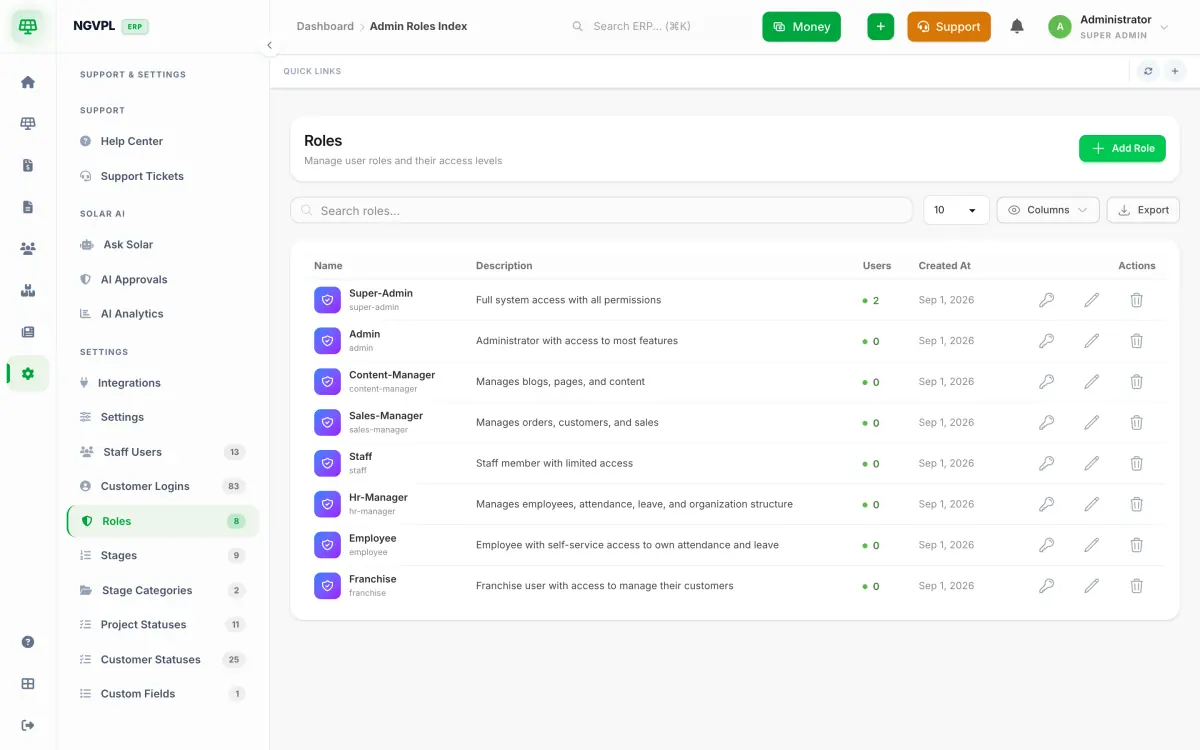
139 permissions across sales, site, accounts and HR; roles are yours to name — gates check the permission, never the role.
HRMS
Attendance with location and selfie, geofenced sites, leave, holidays, salary structures, payroll runs and payslips.
Doors
Customer portal, employee portal and franchise portal on your own domain — each sees exactly its own rows.
The roles table: Super-Admin, Admin, Content-Manager, Sales-Manager, Staff, HR-Manager, Employee, Franchise with descriptions and user counts
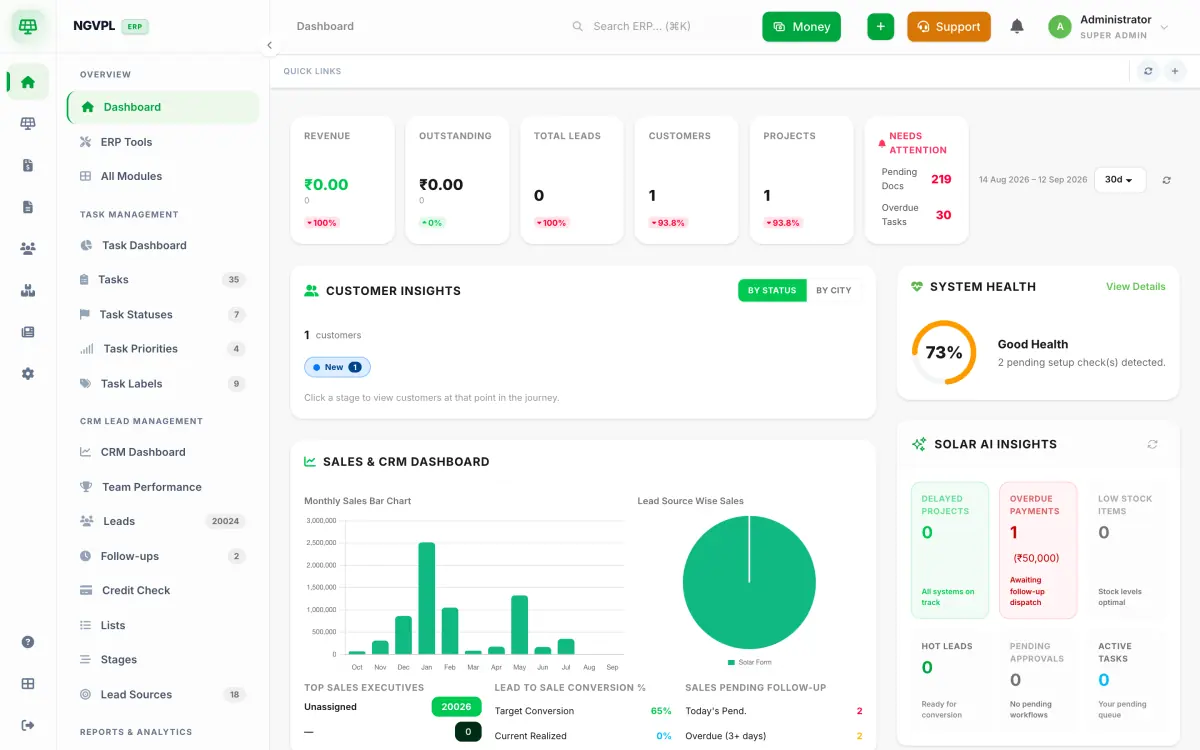
The owner dashboard: revenue, outstanding, leads, customers, projects, needs-attention counts, sales chart and system health
Fig. 07Roles · owner dashboard

Chapter 08 · Ask Solar AI

Talk to your ERP — Hindi ya English, on your own data.

Voice
"Kal ke site visits kaunse hain?" — speak it, hear the answer, while driving to the next roof.
Bill photo
Photograph the electricity bill: consumer number, sanctioned load, DISCOM, units and address fill the lead. No typing.
Reports
"Projects stuck at DISCOM feasibility for more than 20 days" — answered from live rows, with a link to each project.

See Ask Solar in the demo

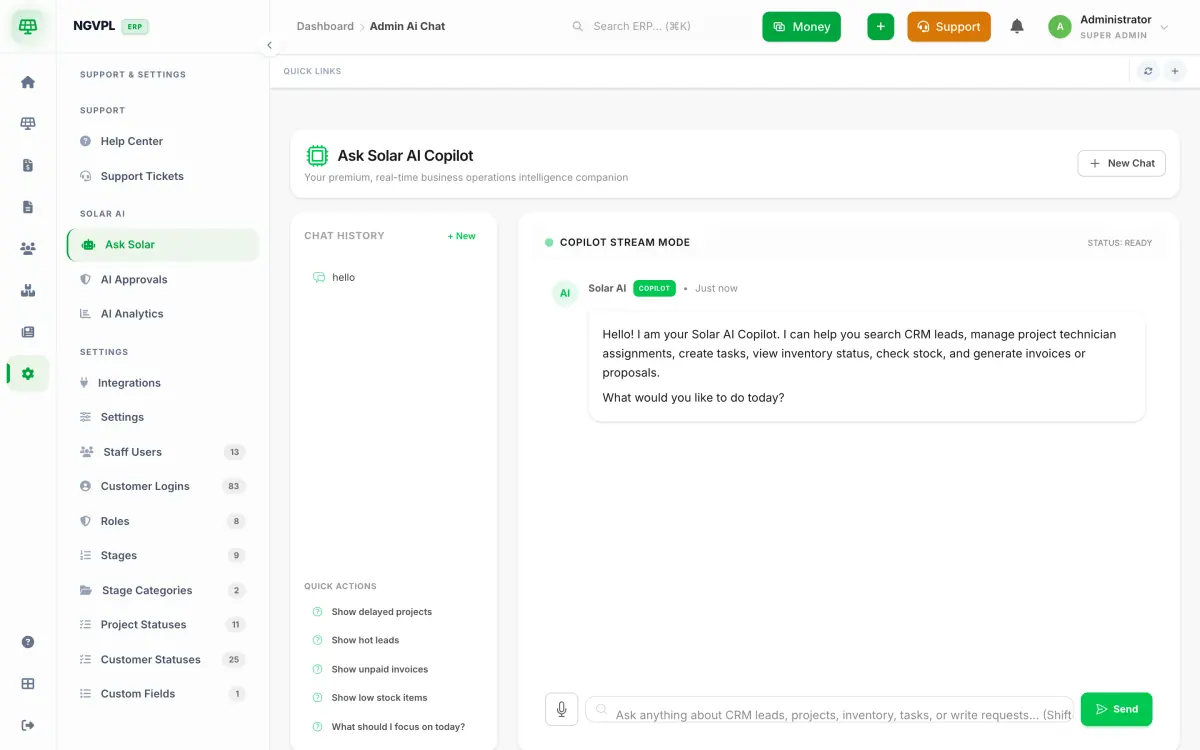
Ask Solar AI copilot chat inside SolarERP with chat history, quick actions and a message box with a microphone
Fig. 08Ask Solar copilot

Appendix A · Connections

Plugged into where Indian solar leads, messages and payments actually happen.

Lead source

IndiaMART

Lead source

Justdial

Lead source

HelloLeads

Lead source

Facebook Lead Ads

Lead source

Instagram

Website forms

Contact Form 7 / any webhook

Automation

Make · Zapier · n8n

Roof insights

Google Solar API

WhatsApp

WATI

WhatsApp

Interakt

WhatsApp

Aisensy

SMS & OTP

MSG91

Payments

PayU

Payments

Cashfree

KYC & credit check

Surepass

Staff app

Google Play

Appendix B · Staff app · Android

Sales and site teams carry the ERP in their pocket. It talks only to your own deployment.

Leads
Call, WhatsApp, log the visit, move the stage; scan a bill to create a lead on the spot.
Surveys
Roof photos with GPS, load details and measurements, uploaded from the roof — offline-tolerant.
Projects
Stage updates with photos, tasks with due dates, material issue acknowledgement.
Attendance
Check-in with location and selfie, QR sign-in at sites, opt-in live location for the day.
Security
Sanctum token per device, permission-gated screens, remote sign-out; minimum app version enforced from the server.

Pricing

Per company, per month. Not per lead, not per project.

Own database per company · GST extra · annual billing available

Plan Leads

Enquiries, follow-ups, tasks and paperwork. No customers, no projects.

Starter

Adds customers, projects, surveys and proposals to the Leads tier.

Growth

Adds billing, inventory and HR to the Starter tier.

Professional

Adds counter sales, the online store, franchise partners and Solar AI.

Enterprise

Everything, including the public website and careers portal.

Price ₹3,500/ month + GST ₹6,000/ month + GST ₹45,000/ month + GST ₹200,000/ month + GST
Users Up to 5 Up to 10 Up to 100 Unlimited
Database Own MySQL DB Own MySQL DB Own MySQL DB Own MySQL DB
Billing & Finance — —
Blog — — —
CRM & Leads
Careers — — —
Core
Document Management
E-commerce — —
Franchise — —
HRMS — —
Inventory — —
Point of Sale — —
Public Website — — —
Solar AI — —
Solar EPC —
SolarERP Dialer
Task Management
Talk to sales Talk to sales Talk to sales Talk to sales

WhatsApp, SMS and credit-check APIs are metered at cost from a prepaid wallet. Onboarding, data import and training included.

Schedule D · Questions

What EPC owners ask on the first call.

Ask on a demo call
Q01Who owns the data — us or SolarERP?
You do. Every company runs on its own separate database on servers in India. Export your leads, customers, projects and invoices to Excel/CSV whenever you like, and we hand over a full database dump if you ever leave.
Q02Is our data mixed with other EPC companies?
No. SolarERP is deployed per company: one application, one MySQL database, one login URL such as yourcompany.solarerp.in. There is no shared table with a company column — another tenant cannot even accidentally see your rows.
Q03Can we use our own domain and branding?
Yes. Run the ERP and customer portal on crm.yourcompany.com with your logo, colours, PDF templates and email/WhatsApp sender identity. SSL is handled for you.
Q04Does invoicing handle GST correctly?
Invoices, quotations and delivery challans apply CGST + SGST for intra-state and IGST for inter-state supply based on place of supply, with HSN/SAC codes, e-invoice-ready fields and GSTR-friendly exports.
Q05How does subsidy and net-metering tracking work?
Each project carries its DISCOM application, feasibility, meter installation and commissioning stages, plus the PM Surya Ghar / state subsidy stages with document checklists and dates. Owners see every stuck application on one dashboard; customers see their status in the portal.
Q06Is there a mobile app for field staff?
Yes — the SolarERP staff app on Google Play. Sales and site teams log leads, upload survey photos, update project stages, check in with location and see their tasks. It talks to your own deployment only.
Q07Can it send WhatsApp and SMS to customers automatically?
Yes. Connect WATI, Interakt or Aisensy for WhatsApp and MSG91 for SMS/OTP. Alerts fire on events such as proposal sent, payment received, installation scheduled and net-meter installed, using approved templates.
Q08Where do my leads come from?
IndiaMART, Justdial, HelloLeads, Facebook/Instagram lead ads, your website forms (Contact Form 7, any webhook), WhatsApp and manual entry. Leads land in one pipeline with source tracking, auto-assignment and follow-up reminders.
Q09How is SolarERP priced?
A monthly subscription per company based on the modules you switch on and the number of users — not per lead or per project. WhatsApp/SMS and credit-bureau API usage is metered from a prepaid wallet at cost. Ask for a quote on the demo call.
Q10How long does onboarding take?
A new company is provisioned the same day. Most EPCs import their existing leads and customers from Excel, set up proposal templates and go live within a week, with training for the sales and site teams included.
Q11What support do we get?
Support tickets from inside the ERP, WhatsApp support during business hours, and product updates rolled out to your deployment without downtime. Every EPC on the platform gets the same product improvements.
Form 01 · Book a demo

Book a 30-min demo. See your own numbers in it.

Book a 30-min demo

30-minute screen-share · no card needed

Tell us what you install per month and which modules matter. We show you the exact flow your team would use, then set up a trial company for you.

Who
A live walkthrough with someone who knows DISCOM paperwork, not a generic sales script.
When
Your company provisioned the same day if you decide to go ahead; Excel import of leads and customers included.

* required · we never share your details

What do you want to see? (optional)

30-minute screen-share · no card needed

Form 01 · Book a demo

See SolarERP on your own numbers.

Tell us a little about your EPC business. We walk you through the modules that matter to you — lead to net-meter — in 30 minutes.

* required · we never share your details

What do you want to see? (optional)

30-minute screen-share · no card needed